
About SEOGadget for Excel
For a long, long time we’ve used Microsoft Excel to gain insight, make calculations, create reports and solve problems. While perhaps, a full time developer might see some limitation in the platform, Excel is a godsend to almost the entire search marketing ecosystem.
For most of us, working with data from 3rd party marketing tools tends to begin with a CSV export. If you think about how much time we’ve all spent waiting for a CSV file to download, and how much time we’ve spent merging the data into Excel after the event, you might agree it’s a time sink, and not a terribly productive part of your analysis.
SEOgadget for Excel addresses that problem by connecting directly to services such as Majestic SEO and Moz via their API services.
We’re very pleased to support these services:
This guide teaches you, from the very beginning, how to use SEOgadget for Excel covering each of its main functions.
SYSTEM REQUIREMENTS
Well, this is awkward. Excel DNA (Excel-DNA is an independent project to integrate .NET into Excel) only works with Windows based installations of Office. Specifically, Windows 7,8 or 8.1 with Office 2010 or 2013. 32 bit is still supported in Windows 7, but ideally you should be using the 64 bit installation.
As a side note, Ubuntu users could install Virtualbox and Apple Mac users could run this on Parallels.
Getting Started
GRABBING YOUR API KEYS
Authorising Majestic via OpenApps
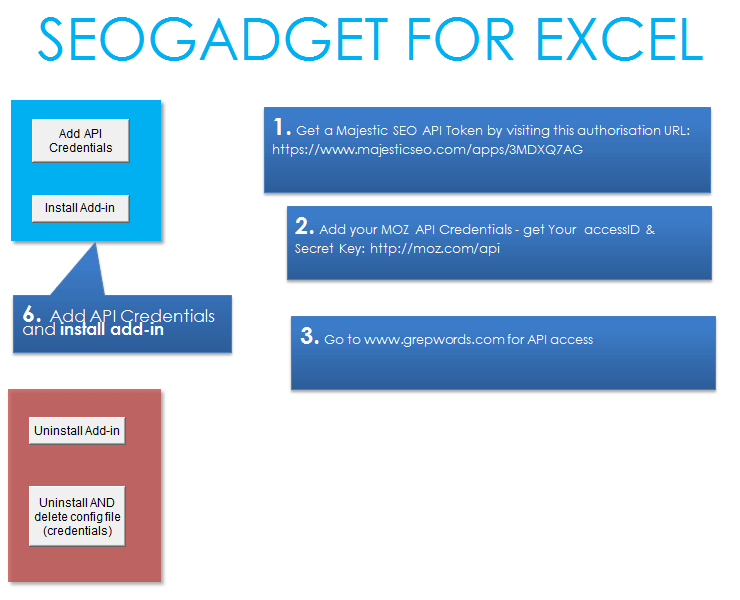
1) To get an open APPs token for SEOgadget for Excel, head to this OpenApps Authorisation URL:
https://www.majesticseo.com/apps/3MDXQ7AG
2) Login as instructed:

3) Then click “Grant Access”
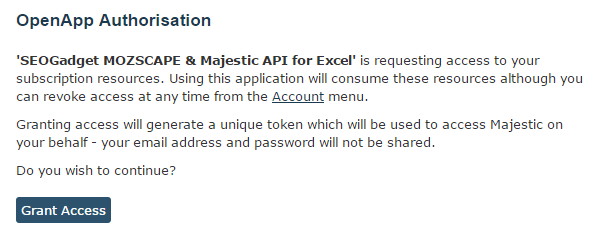
You’ll need to have a Platinum subscription to make full use of this extension.
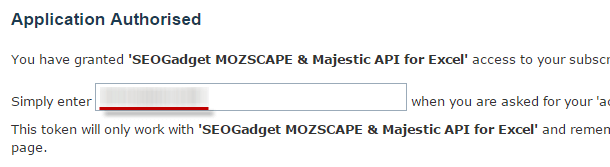
4) Copy the access key from the text below:
Moz API Credentials
You’ll need to be a PRO Member at Moz to make full use of this extension, but much of the Links API and URL Metrics capabilities are free.
Get Your AccessID & Secret Key here: https://moz.com/api
Keyword Research with the Grepwords API
Get US and International search volumes via Grepwords – head here to apply for an API key.
Installing SEOgadget For Excel
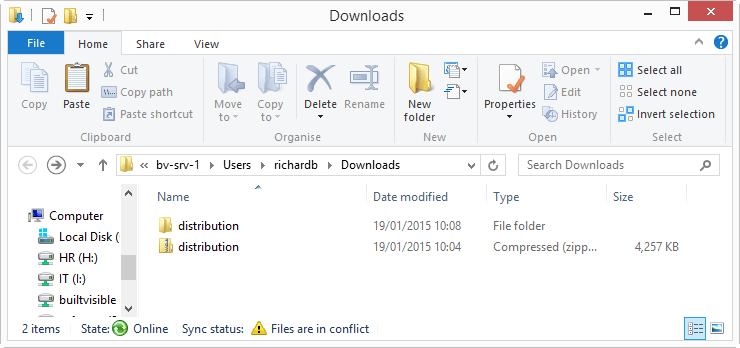
1) Firstly, you’ll need to download the installation file. Save the zip file in a folder of your choice, and extract the distribution folder from the zip:
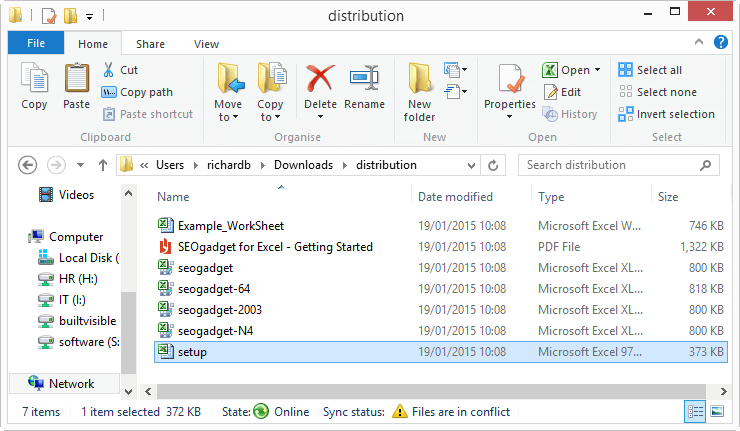
2) Run “setup.xls”
3) Being sure to *have your Majestic, Moz, SEMrush and Grepwords keys to hand, click the yellow enable button:

Then click: “Add API Credentials”.
If you’re not a subscriber to any of these services, leave the token field blank – everything else will work.
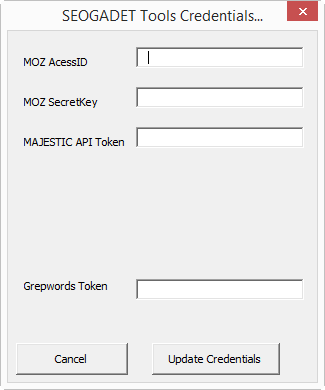
Click the “Add Credentials” button and you’ll be given a dialog box. Paste your API tokens in here. You can leave any fields blank, just re-run setup if you acquire new API tokens.
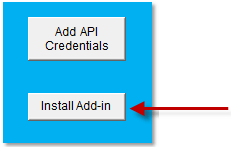
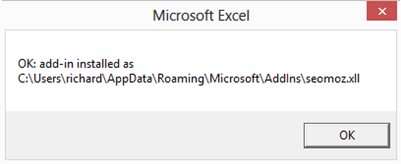
Add credentials, and click “Install Add-in”
Working with Links Data APIs
Learn Seogadget For Excel With The Moz Url Metrics API
With SEOgadget for Excel, you can get data and results very quickly. The start of our tutorial focuses on the simplest API call, the Moz URL Metrics API. Spend a little time playing with this function, and the rest of the Moz API calls and you’ll soon be ready to go and quickly master Majestic, SEMrush and Grepwords too.
The URL Metrics API should be very familiar to us marketers. It powers the Moz toolbar, and gives us familiar metrics like Page Authority and Domain Authority. It’s also free.
Get your API key from Moz, here: https://moz.com/products/api
LET’S TRY A FEW SIMPLE COPY AND PASTE QUERIES
Let’s start with a really simple query, requesting data from Moz’s URL metrics API for a URL in cell A3. Put a URL in Cell A3, (like https://builtvisible.com) and paste this query anywhere you like:
If you’d like to, you can create a list of URLs, and use a range in your query, like this:=MOZ_URLMetrics_toFit(A3:A4)
Here’s what you’ll see:
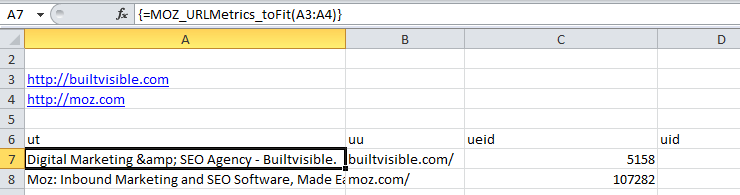
Take a look at the output – you’ll see “ut”, “uu”, “ueid” in the top of your array.
They’re called response field names, and they’re unique to different types of data.
In this case, “uu” Is the “Canonical URL” and “ut” is the Title of the URL.
To get a full understanding of these field names, head to the URL metrics API documentation. In the API documentation, you’ll see a table that details what each field name represents and outlines the corresponding bit flag number, explained below.
| URL Metric | Bit Flag | Response Field | Description | Free Access? |
|---|---|---|---|---|
| Title | 1 | ut | The title of the page, if available | yes |
| Canonical URL | 4 | uu | The canonical form of the URL | yes |
| Subdomain | 8 | ufq | The subdomain of the URL (for example, apiwiki.moz.com) | no |
| Root Domain | 16 | upl | The root domain of the URL (for example, moz.com) | no |
| External Equity Links | 32 | ueid | The number of external equity links to the URL | yes |
| Subdomain External Links | 64 | feid | The number of external equity links to the subdomain of the URL | no |
For the full table, go to the API documentation: https://apiwiki.moz.com/url-metrics
WRITING DATA TO TABLES, RANGES AND CELLS
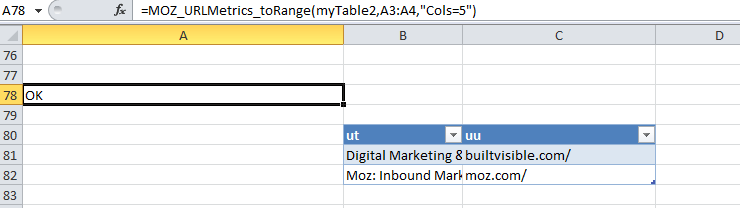
Let’s imagine you only wanted to retrieve our two data points, Title and Canonical URL with “Cols=5”, but write them to a table or a range instead of fitting to an array.
So far, you’ve seen the function:=MOZ_URLMetrics_toFit()
There are several “helper” functions, each designed to fit the data received from the API output.
They’re: “_toFit”, “_toSheet”, and “_toRange”:
=MOZ_URLMetrics_toFit("builtvisible.com")
=MOZ_URLMetrics_toSheet("builtvisible.com")
=MOZ_URLMetrics_toRange("Sheet2", "builtvisible.com")
=MOZ_URLMetrics_toRange("myTable", "www.yahoo.com")
Try copying and pasting each of these queries into Excel to see what they do! Don’t forget to create a table (of any size) called “myTable” – one of these queries will send the data to an entirely new sheet, so be ready to hunt around for your data!
_ToFit
With _toFit, Excel simply creates an array in the correct size, fitting the data it receives into an appropriate space for you.
_ToRange
Using _toRange with a table or cell reference or cell range is very powerful and you’re more able to edit the original formula (which is impossible using arrays offered by the _toFit function.
For example, let’s say you’d like to fetch the Canonical URL (uu) and Title (ut) and write the data to a table called: myTable. Create a table (instructions) and name it “myTable”. Use “[#All]” in the table name to stop the table moving down 1 row every time you refresh the data: “myTable[#All]”
The query will look like this:=MOZ_URLMetrics_toRange("myTable[#All]",A3:A4,"Cols=5")
WHICH HELPER SHOULD I CHOOSE?
Most of the time, “_toRange” is the best helper to use because it’s very dynamic in nature, you specify a table, the function populates that table. Amazing.
FILTERING THE DATA YOU NEED
What if you only want a certain type of data from a Moz API call, say the Titles and Canonical URLs for each URL?
Uniquely, the Moz URL Metrics API uses “Bit Flags”, integer values that can be specified in a “Cols=” argument to request only the data that’s needed. So, if you only wanted the Titles and Canonical URLs for each URL, you’d add the “Cols=” argument into the query:=MOZ_URLMetrics_toRange("mynewtable[#All]",A3,"Cols=5")
The value, “Cols=5” is the sum of the “ut” bit flag value of 1 plus the “uu” bit flag value of 4. The sum value, 3 is unique, no other combination of values will result in a sum of 5. “Cols=5” returns the URL title and canonical URL.

EXAMPLE – URL METRICS APIMOZ_URLMetrics_toRange("mynewTable[#All]",A3:A4,"Cols=133714411517")
This query makes a request of the Moz URL Metrics API, outputting the data to range: “mynewtable” (you need to create a small table and name it “mynewtable” first) for a row of URLs found in cell range A3:A4.
Using “Cols=133714411517”, we’ve requested every output field available in the paid API.
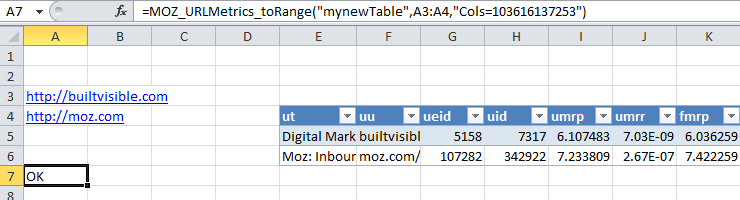
If you only have access to the free API, use:=MOZ_URLMetrics_toRange("mynewTable[#All]",A3:A4,"Cols=103616137253")
OUTPUT:
Your output table will look like this:
Url Metrics API Recap
Now we’ve covered the fundamentals of the extension, we’ll use this format to explain each new feature in the SEOgadget for Excel extension:=MOZ_URLMetrics([URL],[BIT])
Where: The 1st argument [URL] can be either a single URL (without the https://) or a list of URLS (via a vertical or horizontal range).
The 2nd argument [BIT] is the bit flag to indicate which columns to return. Bit
flag values can be added together at the user’s discretion:=MOZ_URLMetrics_toRange("mynewTable[#All]",A1,"Cols=103079215109")
Will give you data from the (free) URL metrics API including Page Authority.
Example Query:=MOZ_URLMetrics_toRange("mynewTable[#All]",A3:A4,"Cols=133714411517")
OUTPUT:
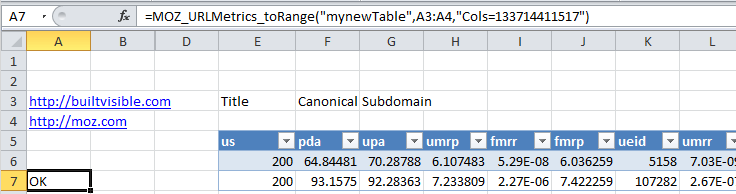
If you’re a paid subscriber to Moz’s API service, this query will give you all the data available via the URL metrics endpoint. In this case, the data will be for the URLs found in range A3:A4 – your data will be outputted to a table. Create that table first, and name it “mynewTable” (or anything else you’d like).
Read the API documentation, paying particular attention to bit flag values, and response field names. Don’t worry; they all start to make sense after a while: https://apiwiki.moz.com/url-metrics.
Moz Anchor Text API
Understanding how a page links to another is one of the most important aspects of SEO today. As marketers, we’re often on the lookout for suspicious links that use “exact match” anchor text – with a view to removing them, realigning them, or whatever our SEO strategy dictates.
The Moz Anchor Text API allows us to fetch the anchor text data for a root domain, subdomain, or page. In the Anchor text API calls, we can analyse phrases or terms linking to a page.
ANCHOR TEXT API QUERY CONSTRUCTION
As you read this section, open up Moz’s API documentation for the anchor text API: https://apiwiki.moz.com/anchor-text=MOZ_anchorTextAPI([URL],[SCOPE],[SORT],[BIT],[LIMIT],[CHUNK])
Where: The 1st argument [URL] can be either a single URL (without the https://) or a list of URLS (via a vertical or horizontal range).
The 2nd argument [SCOPE] e.g. “page_to_page” – Returns a set of Source pages linking to the specified Target page.
The 3rd argument [SORT] e.g. “page_authority” – Sort results by Page Authority
The 4th argument [BIT] – The bit flag to indicate which columns to return.
The 5th argument [LIMIT] – How many results do we require? This is limited based on the level of API service you subscribe to – see pricing here.
The 6th argument [CHUNK] – request in batches – e.g., fetch 100 results requesting in batches of 10 URLs per API call – you can usually ask for 1000 results in a single batch
UNDERSTANDING “SCOPE” IN THE ANCHOR TEXT API
For the Anchor Text API, Scope is an argument used to return phrases found in links to the target URL (“phrase_to_page”), phrases found in links to the subdomain of the target URL (“phrase_to_subdomain”) and phrases found in links to the root domain of the target URL (“phrase_to_domain”).
The API will also return terms found simply by swapping “phrase” to “term”.
UNDERSTANDING “SORT” IN THE ANCHOR TEXT API
In Moz’s Anchor Text API, the only available sort function appears to be “domains_linking_page” – sort by the number of domains that link to our page with this anchor text.
The idea of scope and sort reappears later in the Moz Links. For now, let’s look at some examples.
ANCHOR TEXT API – COPY / PASTE EXAMPLE
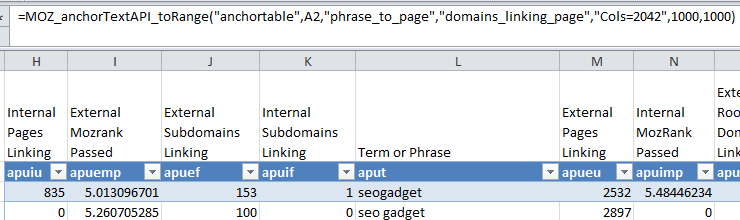
This query will give you the first 100 anchor text phrases (anchor phrases to your page) linking to your URL (a URL in cell A2). The data would be requested via a single batch of 1000 rows and placed in table “yourtable”. All of the anchor text values are being requested in “Cols=2048” (see: anchor text values in the Moz API documentation)=MOZ_anchorTextAPI_toRange("yourtable[#All]",A2,"phrase_to_page","domains_linking_page","Cols=2042",100,100)
OUTPUT
The Moz Top Pages API
What are the most linked to pages on a domain? The top pages API call (accessible to Mozscape paid users), returns URLs on a domain in order of the volume of inbound linking root domains to each URL.
What are the most linked to pages on a domain? The top pages API call (accessible to Mozscape paid users), returns URLs on a domain in order of the volume of inbound linking root domains to each URL.
TOP PAGES API QUERY CONSTRUCTION
As you read this section, open up Moz’s API documentation for the top pages API: https://apiwiki.moz.com/top-pages=MOZ_TopPages([URL],[BIT],[LIMIT],[CHUNK])
Similarly to all SEOgadget for Excel functions, appending “_toRange” or “_toFit” to the function will place the output in a table, cell range or an array.
The 1st argument [URL] can be either a single URL (without the https://) or a list of URLS (via a vertical or horizontal range).
The 2nd argument [BIT] the bit flag to indicate which columns to return – refer to this list of bit fields in the API documentation: https://apiwiki.moz.com/top-pages
The 3rd argument [LIMIT] how many results do we require?
The 4th argument [CHUNK] send request in batches – for example, fetch 100 results requesting in batches of 10 URLs per API call
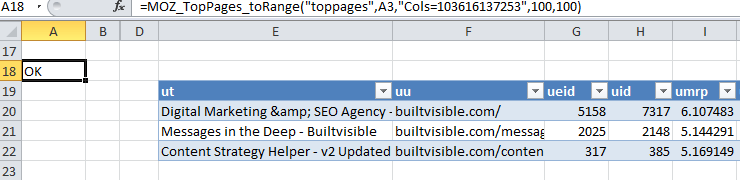
Example:=MOZ_TopPages_toRange("toppages[#All]",A3,"Cols=103616137253",100,100)
OUTPUT
Will return linking title (“ut”), URL (“uu”), external links (“ueid”), links (“uid”), mozRank (“umrp”), mozRank raw (“umrr”), Subdomain mozRank (“fmrp”) + (“fmrr”), http status (“us”), Page Authority (“upa”) and Domain Authority (“pda”)
The Moz Links API
The Links API powers Open Site Explorer and allows you to see the links pointing to a URL, root domain or subdomain.
Data can be returned sorted by Domain or Page Authority. This query is the mother of all Excel functions – if you can master this query, you’ll be able to build some seriously impressive Excel apps based on the Moz API!
LINKS API QUERY CONSTRUCTION
Before reading this, take a look at Moz’s Links API documentation. Skim through it, read the API call scopes, sorts and filter construction. Next, gain an appreciation for the meaning of “TargetCols”, “SourceCols” and “LinkCols”. Now read the API documentation again.
Here’s the query structure:=MOZ_linksapi([URL],[SCOPE],[SORT],[FILTER],[TARGETCOLS],[SOURCECOLS],[LINKCOLS],[LIMIT],[CHUNK])
The 1st argument [URL] can be either a single URL (without the https://) or a list of URLS (via a vertical or horizontal range).
The 2nd argument [SCOPE] e.g. “page_to_page” Returns a set of Source domains, root domains or URLs linking to the specified Target URL, domain or root domain – for a full list visit the Links API documentation.
The 3rd argument [SORT] e.g. “page_authority” Sort results by Page Authority, Domain Authority – for a full list visit the Sort section in the Links API documentation.
The 4th argument [FILTER] apply a filter to the call, eg: “external+follow” for external, followed links – for a full list visit the Filter section in the Links API documentation.
The 5th argument [TARGETCOLS] specifies data about the target of the link is included eg: “TargetCols=8” would give the linked to subdomain
The 6th argument [SOURCECOLS] specifies data about the source page of the link e.g. “SourceCols=103079215109” would give OSE results!
The 7th argument [LINKCOLS] specifies data about the link itself, e.g. “LinkCols=8” would give normalised anchor text. For a full list visit the Link Metric Bit Flags section in the Links API documentation.
The 8th argument [LIMIT] how many results do we require? Paid API will allow more results.
The 9th argument [CHUNK] send request in batches – for example, fetch 100 results requesting in batches of 23 URLs per API call
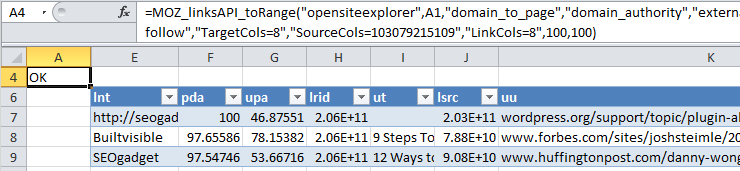
EXAMPLE 1:=MOZ_linksAPI_toRange("opensiteexplorer[#All]",A1,"domain_to_page","domain_authority","external+follow","TargetCols=8","SourceCols=103079215109","LinkCols=8",100,100)
In this call, we’ve asked for the filters “external+follow” to be applied – showing only external links that do not use “rel=”nofollow” in the href link.
“TargetCols” is set to 8 – showing the subdomain (“luufq”) of the URL the links are pointing to. “SourceCols” is set to 103079215109 which will give every freely available URL metrics data point on the linking URLs.
“LinkCols” is set to 8, which represents normalised anchor text.
OUTPUT:
This API call will give the first 100 linking domains to your page, sorted by domain authority, the output will look like this (check the field names against the URL metrics values to understand what data you’re looking at!)
If you have a paid Moz API subscription, you could adapt “SourceCols” to the full API output to gather all the Metrics data for your URLs. That query would look like this:=MOZ_linksAPI_toRange("opensiteexplorer[#All]",A1,"domain_to_page","domain_authority","external+follow","TargetCols=8","SourceCols=133714411517","LinkCols=8",100,100)
EXAMPLE 2:
This query outputs the same URL metrics data per link as our first call, but this time we’re showing “single links per set of root domains linking to any page on the specified target’s root domain” via the “domain_to_domain” scope.
We’re filtering for “nonequity” – “links with any of these attributes specified: nofollow, meta-nofollow, offscreen, 302 or an RSS feed”.=MOZ_linksAPI_toRange("mysiteexplorer[#All]",A1,"domain_to_domain","domain_authority","nonequity","TargetCols=8","SourceCols=103079215109","LinkCols=8",100,100)
Majestic API
QUERY THE FRESH AND HISTORIC LINK INDICES
Majestic’s API is a powerful, fast endpoint to request data from their fresh and historic indices. We use this API heavily in our own software and internal Excel / data analysis work.
WHAT MAJESTIC API CALLS SEOGADGET FOR EXCEL SUPPORT?
SEOgadget for Excel supports the 12 main functions of the API, for example: “GetIndexItemInfo” – a call that returns key statistics for index items (domain/subdomain/URL) such as: number of external backlinks and referring domains pointing to index item.
=MAJESTICAPI_ AS A WRAPPER FUNCTION
There are too many separate functions in the Majestic API to justify separate function names in Excel. So, rather than creating separate functions for each API call, the =MajesticAPI() function acts as a wrapper for all other API calls.
For example, to get the data on external back links and referring domains pointing to a URL, we use the “GetBackLinkData” command as the first argument in the =MajesticAPI() function.
The following formula would populate a table called “majestictable” with data for the domain builtvisible.com:=majesticAPI_toRange("majestictable[#All]","GetBackLinkData","fresh","builtvisble.com","ShowDomainInfo=1,Count=5")
MAJESTIC WRAPPER FUNCTION QUERY CONSTRUCTION=majesticAPI([ARG1],[ARG2],[ARG3],[ARG4],[ARG5],[ARG6],[ARG7])
This function can handle all API commands as published (and any new ones, as long as the response format remains the same).
The 1st argument [ARG1] is the command to execute. For example, “GetAnchorText”, “GetBackLinkData”, “GetBackLinksHistory” or “GetHostedDomains”.
The 2nd argument [ARG2] is the value to assign to the index “datasource” API parameter – “fresh” or “historic”
The 3rd argument [ARG3] handles the URL(s) passed to the API. Many accept a list of URLs in the format: “item0,item1,item3” others a single “item” or “Query” parameter. Read the individual Command Name pages top get a feel for what’s possible.
The 4th argument [ARG4] handles any other API parameters not covered by 2 & 3 above. The name-value pairs may be supplied as a CSV list or via a range pointing at a two column table holding such. You could ignore the 2nd & 3rd arguments and simply use this mechanism for all parameters if preferred.
As the API can return 1 or more tables of data use the 5th argument [ARG5] to specify which table. If not specified 1st table is returned.
The 6th argument [ARG6] if set to TRUE will ignore the API’s cache. In general, using the cache is a good idea as Excel can call a formula multiple times even if that’s not the intention.
The (separate) cache associated with the Majestic API is even more useful due to the multiple tables sometimes returned. Without the cache, each table fetch would make a resource consuming call back to Majestic.
The 7th argument [ARG7] is the API call http timeout (in seconds), which defaults to a long 60 seconds if left un-configured.
MAJESTIC GETBACKLINKDATA API: GET DATA ON YOUR BACK LINKS TO A URL
Let’s make a start with some actionable queries. “GetBackLinkData” is probably the most powerful links analysis function on the planet – allowing access to Majestic’s huge database of links.
GETBACKLINKDATA API – COPY / PASTE EXAMPLES
Example Query:
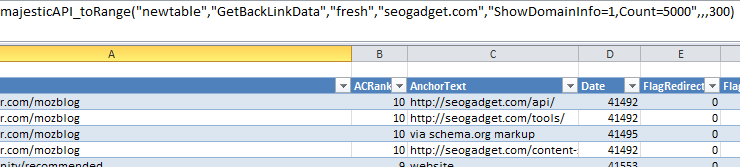
This query will get the top 1000 links from the fresh index to the root domain, builtvisible.com, writing the data to a table called “majestictable”:=majesticAPI_toRange("majestictable[#All]","GetBackLinkData","fresh","builtvisible.com","ShowDomainInfo=1,Count=1000")
OUTPUT
API Documentation: https://developer-support.majestic.com/api/commands/get-back-link-data.shtml
You’ll see a large amount of data outputted (this is only a small section of the first 10 columns! A full breakdown of the meaning of all of the API’s output headers can be found at the bottom of this page.
MAJESTIC GETANCHORTEXTAPI: GET THE ANCHOR TEXT LINKS TO A URL
This powerful API function returns Anchor text for a given domain, subdomain or URL, from Majestic’s Fresh or Historic index as well as allowing you to filter the results by a keyword.
GETANCHORTEXTAPI – COPY / PASTE EXAMPLES
Example Query:
Get the top 10 anchors to the domain builtvisible.com from the historic index and write those results to a table called “majesticanchor”:=majesticAPI_toRange("majesticanchor[#All]","GetAnchorText","historic","builtvisible.com")
If you’d like to fetch the first 100 linking anchor texts in Majestic’s fresh index to your domain, try this:=majesticAPI_toRange("majesticanchor[#All]","GetAnchorText","fresh","builtvisible.com","ShowDomainInfo=1,Count=100")
OUTPUT
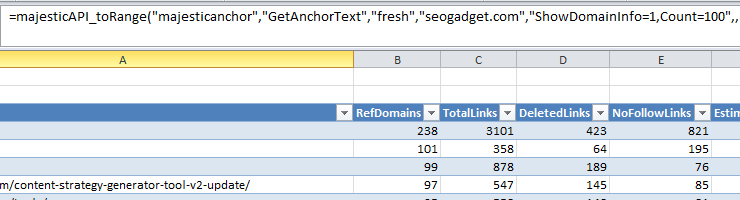
API Documentation: https://developer-support.majestic.com/api/commands/get-anchor-text.shtml
MAJESTIC GETINDEXITEMINFO API – GET URL METRICS
The URL metrics endpoint for Majestic, providing a rich array of datapoints including: “ExtBackLinks”, “RefDomains”, “ACRank”, “IndexedURLs”, “RefIPs”, “RefSubNets”, “RefDomainsEDU”, “CitationFlow” and “TrustFlow”.
GETINDEXITEMINFO – COPY / PASTE EXAMPLES
Example Query:
Get Majestic’s URL metrics about builtvisible.com and Bronco.co.uk
Write the URL metrics data from the fresh index to a table called: “majesticmetrics”=majesticAPI_toRange("majesticmetrics[#All]","GetIndexItemInfo","fresh","builtvisible.com,bronco.co.uk")
Fetch URL metrics data for a range of domains or URLs (should be fine for around 1000 at a time)=majesticAPI_toRange("majesticmetrics[#All]","GetIndexItemInfo","fresh",H14:H19)
OUTPUT
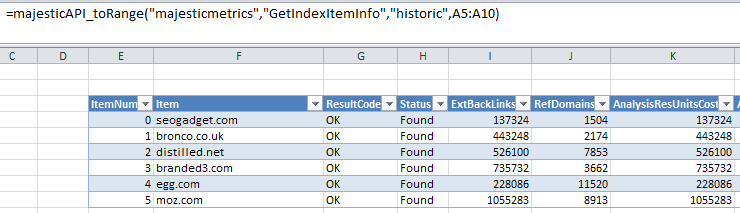
API Documentation: https://developer-support.majestic.com/api/commands/get-index-item-info.shtml
MAJESTIC GETBACKLINKSHISTORY API – GET THE BACKLINK HISTORY OF A DOMAIN
Use this API call to get your backlink growth history – for multiple domains. Outputs data in monthly columns, with link counts categorised by link type, for example: “TextLink”, “ImageLink”, “Redirect”, “Frame”, “Mention”, “NoFollow.
GETBACKLINKSHISTORY – COPY / PASTE EXAMPLES
Example Query:
Show the complete backlink acquisition history for builtvisible.com and write the history data to a table called “majestichistory”:=majesticAPI_toRange("majestichistory[#All]","GetBackLinksHistory","historic","builtvisible.com",,"item0")
For a single API call (cached) you can request the backlink history for multiple items (domains) like this:=majesticAPI_ toRange("majestichistory[#All]","historic","builtvisible.com,bronco.co.uk",,"item0")
Where “item0” would be “seogadget.com”‘s backlinks and “item1” would be bronco.co.uk. By pasting in this 2nd query:=majesticAPI_ toRange("majestichistory2[#All]","historic","builtvisible.com,bronco.co.uk",,"item1")
The backlink history for Bronco would be written to the table “majestichistory2” without making another API call.
OUTPUT
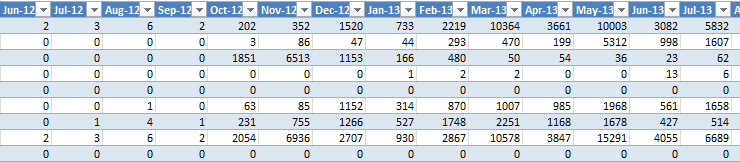
By comparing the data from multiple domains, you can make compelling performance / comparison charts like the one at the top of this guide!
API Documentation: https://developer-support.majestic.com/api/commands/get-back-links-history.shtml
MAJESTIC GETNEWLOSTBACKLINKS API – TRACK NEW AND LOST LINKS
This function returns new and lost backlinks in a date range from Majestic’s fresh or historic indices.
GETNEWLOSTBACKLINKS – COPY / PASTE EXAMPLES
Example Query:
Find 20 new links in the last index update for builtvisible.com and write the data to a table called “majesticlost”=majesticAPI_toRange("majesticlost[#All]","GetNewLostBackLinks","fresh","builtvisible.com","Count=20,Mode=0")
Find 200 lost links (“Count=200,Mode=1”) in the last fresh index update for builtvisible.com and write the data to a table called “majesticlost”=majesticAPI_toRange("majesticlost[#All]","GetNewLostBackLinks","fresh","builtvisible.com","Count=200,Mode=1")
Find 200 lost links for builtvisible.com between the 1st January 2013 and the 1st October 2013 and write the data to a table called “majesticlost”=majesticAPI_toRange("majesticlost[#All]","GetNewLostBackLinks","fresh","builtvisible.com","Count=200,Mode=1,Datefrom=2013-01-01,Dateto=2013-10-01")
OUTPUT
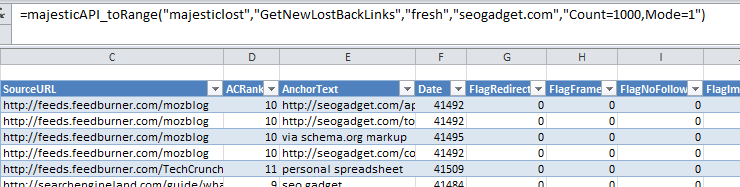
API Documentation: https://developer-support.majestic.com/api/commands/get-new-lost-back-links.shtml
MAJESTIC GETTOPPAGES API – TRACK NEW AND LOST LINKS
This function returns new and lost backlinks in a date range from Majestic’s fresh or historic indices.
GETTOPPAGES – COPY / PASTE EXAMPLES
Example Query:
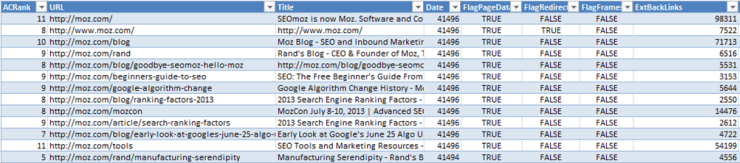
Show me the top 100 pages in order of referring domains linking to moz.com and write the data to a table called “majestictoppages”.=majesticAPI_toRange("majestictoppages[#All]","GetTopPages","historic","moz.com","Count=1000")
OUTPUT
API Documentation: https://developer-support.majesticseo.com/api/commands/get-top-pages.shtml
Working with Keyword Data APIs
GREPWORDS API
The Grepwords API is a powerful, fast endpoint for keyword search volume collection.
For a long time, its output was for US and “global” search volumes only, but that all changed thanks to Russ and his team. Now we have search volumes from Google in around 32 countries. SEOgadget for Excel supports these new locations with just a simple change to your query syntax.
GREPWORDS – A QUICK PRIMER
Working with Grepwords and SEOgadget for Excel is easy – follow this introductory video for a quick primer.
WHAT GREPWORDS API CALLS SEOGADGET FOR EXCEL SUPPORT?
Capabilities supported by SEOgadget for Excel and available via the API allow our users to:
1. Get “related” and “top” keywords from Google search
2. Search data for specific terms from Google search
3. Internationalise the search data
=GREPWORDSAPI_ AS A WRAPPER FUNCTION
The Grepwords API function is a “wrapper” function – the =grepwordsAPI() function stays the same, while arguments inside the formula dictate which service is to be requested.
GREPWORDSAPI QUERY CONSTRUCTION=grepwordsAPI([ARG1], [ARG2], [ARG3], [ARG4], [ARG5], [ARG6], [ARG7], [ARG8])
The 1st Argument [ARG1] requests the service required – “lookup”, “related” or “credits”.
The 2nd Argument [ARG2], “q” requires the phrases to request data on. Phrases can be separated by a pipe ‘|’ delimited list or a cell range. Not a mandatory argument.
The 3rd Argument [ARG3], “index” requests data from either Grepword’s fresh or historic indices.
The 4th Argument [ARG4],” results” is a request for the number of records to return – defaults to 10. Not a mandatory argument.
The 5th Argument [ARG5], “Location” respects Grepqord’s current US defaults, but will work for new locations as they are released into the Grepwords index. Not a mandatory argument.
The 6th Argument [ARG6], “Regex” the SEOgadget for Excel extension will accept regex if set to Y. Not a mandatory argument.
The 7th Argument [ARG7], “ignoreCache” – calls are normally cached, this reduces resource usage and allows for the return of multiple tables in a single call, set to “true” if ignore this cache. Not a mandatory argument.
The 8th Argument [ARG8], “timeout” = sets the web request timeout in seconds, defaults to 30. Not a mandatory argument.
GREPWORDS API: GET “RELATED” AND “TOP” KEYWORDS FROM GOOGLE SEARCH
This function returns keyword data related to the term or phrase specified.
RELATED – COPY / PASTE EXAMPLES
Example Query:
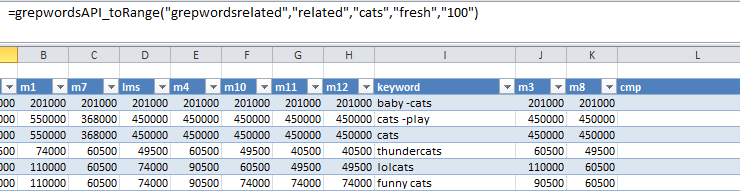
Supply 100 keywords related to the term “cats” and write the data to a table called “grepwordsrelated”.=grepwordsAPI_toRange("grepwordsrelated[#All]","related","cats","fresh","100")
Supply 100 keywords related to the term “cats” in Canada and write the data to a table called “grepwordsrelated”.=grepwordsAPI_toRange("grepwordsrelated[#All]","related","cats","fresh","100","canada")
OUTPUT
API Documentation: https://www.grepwords.com/api.php
GREPWORDS API: SEARCH DATA FOR SPECIFIC TERMS FROM GOOGLE SEARCH
This function returns search data for specific terms provided.
LOOKUP – COPY / PASTE EXAMPLES
Example Query:
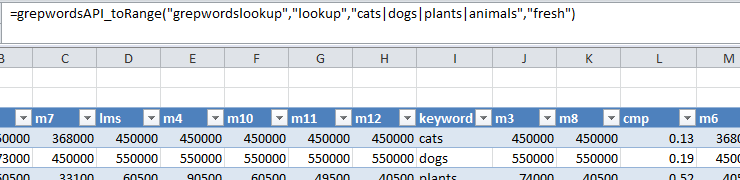
Supply monthly search volumes from Google Search for “cats”, “dogs” and “plants” and write the data to a table called “grepwordslookup”.=grepwordsAPI_toRange("grepwordslookup[#All]","lookup","cats|dogs|plants|animals","fresh")
Supply monthly search volumes from Google Search Canada for “cats”, “dogs” and “plants” and write the data to a tabl
e called “grepwordslookup”.=grepwordsAPI_toRange("greplookup[#All]","lookup","poo|dogs|plants|animals","fresh",,"&loc=canada")
OUTPUT
API Documentation: https://www.grepwords.com/api.php
International Search Data Flags
Obviously, “canada” is but one location. Here’s the full list:
| Country | API parameter | Keywords |
| Brazil | brazil | 3,297,256 |
| Bulgaria | bulgaria | 465,080 |
| Canada | canada | 8,841,539 |
| China (simplified) | china_simplified | 665,401 |
| China (traditional) | china_traditional | 611,844 |
| Finland | finland | 751,213 |
| Germany | germany | 6,007,999 |
| Greece | greece | 315,796 |
| Hungary | hungary | 378,640 |
| India | india | 5,333,614 |
| Ireland | ireland | 4,050,076 |
| Israel | israel | 432,298 |
| Italy | italy | 4,473,976 |
| Japan | japan | 1,962,432 |
| Mexico | mexico | 4,883,220 |
| Netherlands | netherlands | 693,626 |
| New Zeland | newzealand | 2,489,884 |
| Norway | norway | 221,620 |
| Poland | poland | 1,481,989 |
| Portugal | portugal | 1,716,764 |
| Romania | romania | 566,095 |
| Russia | russia | 2,180,883 |
| South Africa | south_africa | 2,559,010 |
| South Korea | south_korea | 254,535 |
| Spain | spain | 4,661,185 |
| Sweden | sweden | 521,601 |
| Turkey | turkey | 1,625,199 |
| United Kingdom | united_kingdom | 11,392,439 |
| United States | us | 90,000,000+ |
Like what you see? Download SEOgadget for Excel…
Other Useful Links And Resources
- How to Make a Pivot Table and Chart in Excel – Builtvisible
- Visualising Search Engine Rankings by Keyword in Excel – Builtvisible
- How To Use VLOOKUP – Builtvisible